
Replay rewind
Replay rewind lets you watch a replay in the engine with time going in either direction. You can seek to any moment, play backward, and change the speed from 0.5x to 32x. The idea comes from BAR-Rewind.
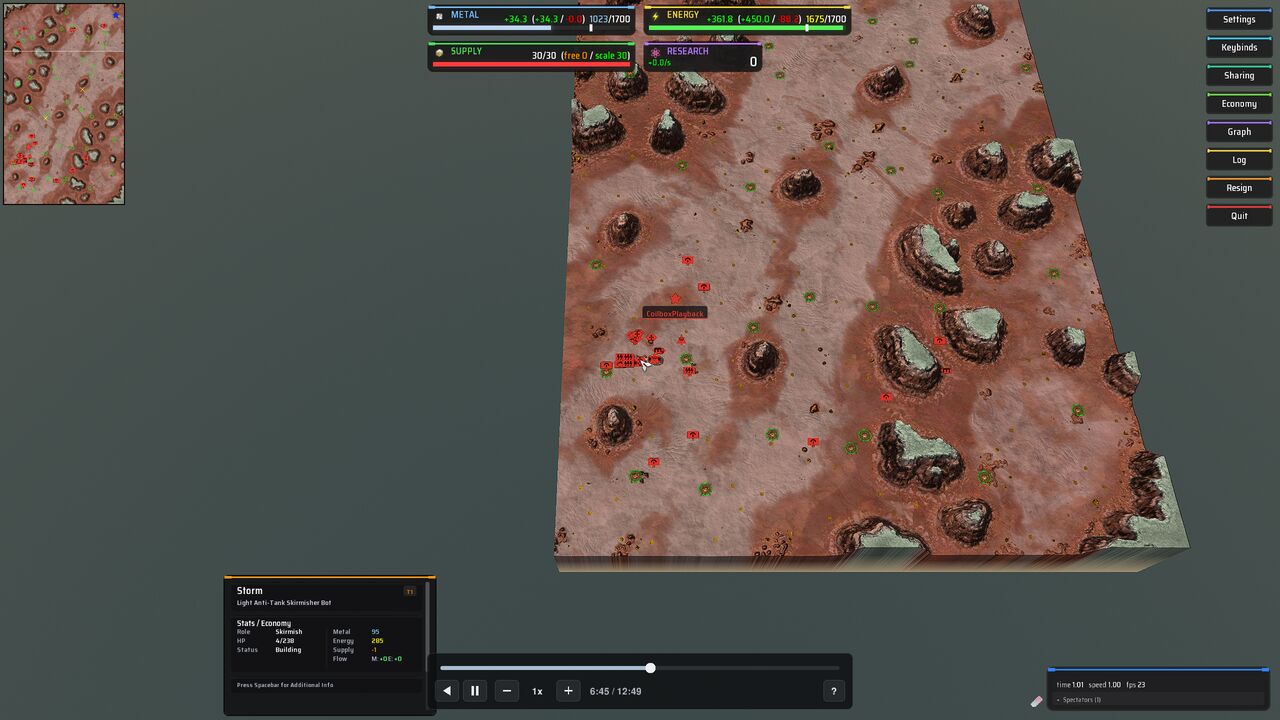
Start from a replay's page. "Watch with rewind" opens the engine on the match with a timeline at the bottom of the screen. If the replay has not been recorded yet, coilbox records it first, which takes a while the first time.
Why a replay has to be recorded first
A replay is a list of orders. The engine plays the match again from them, so it can only play forward. To go backward, coilbox plays the whole match once, writes down where everything was on every frame, and then plays that recording back. The recording is called a track.
The recording run is the first-time wait. Coilbox runs the engine without a window and plays the match from start to end. The match is as long as it was, and playback runs faster than the match did. Two measurements from an Apple M1 Pro show the scale. The engine took 29.34 s and 28.39 s on a 12.83 minute Splinter Faction match, and 153.67 s and 155.65 s on a 45.83 minute Beyond All Reason match. Those figures cover the engine run only. Coilbox then turns the recording into a track, which they do not include.
The confirmation shows an estimate before anything starts. It comes from the earlier recordings of the same game on your computer. If you have none yet, it says "Nothing of this game has been recorded on this computer yet." and shows no estimate.
The track is kept, so each replay is recorded once. Playing a track back does not run the match again, so later opens need no recording.
The recording only counts if the engine reproduces the match exactly. Coilbox checks who won, how long the match lasted and every team's final totals. If any of them differ, it keeps no track and says so. The usual cause is that the engine or game you have installed is not the one the match was played on.
The replay page
Analysis and recording
The "Analysis and recording" section is where you record a replay on its own. One button runs the engine once and makes both the analysis (the list of units made and lost) and the track. Its label depends on what the replay already has, for example "Analyse and record this replay", "Record this replay" or "Analyse and record again".
While it runs you see a progress bar and "Cancel". You can leave the page and the run carries on. "What the engine is saying" shows the engine's output as it runs. A replay waits in a queue if another is ahead of it, or if you are playing a game.
If the replay's own engine is not installed, the section can offer another installed engine, newest first. Different engines often compute a different match, so the result is kept only if it matches exactly.
The replays list has a badge for each replay with a track. "Track recorded" means it can be played. "Track out of date" means another version of the recorder made the track or the file cannot be read. That track is not played until you record the replay again.
Recorded match
When a replay has a current track, a "Recorded match" section draws the match on the map inside coilbox. It does not run the game.
A rectangle is a unit. It has its team's colour, the size of its footprint and a line for the way it faces. A unit still being built is faint. A pale line is a projectile, drawn along the way it moves. A grey square is a wreck or anything else left on the map. Point at a unit to see its name and owner, and click it to keep the name on screen. Click the ground to let it go.
Under the map is the timeline.
- Play in reverse and Play (which becomes Pause) start and stop time.
- The time shows how far into the match you are.
- "Playback speed" is 0.5x, 1x, 2x, 4x, 8x, 16x or 32x.
- The knob, "Time in the match", seeks while you drag it.
- Marks sit above the bar in three rows. "Kills" are units destroyed, "Chat" is chat and "Players leaving" is a player leaving. Marks that would touch are drawn as one, and clicking it goes to the earliest event in it.
- A replay that has not been analysed has no kills.
The page address holds the time, so a link to the page opens at that moment.
The keys work while focus is on the map or the timeline. You cannot change them on this page. In the engine you can.
| Key | Does |
|---|---|
| Space | Play or pause |
| R | Play the other way |
| Left, Right | Back or forward 1 second |
| Shift and Left, Shift and Right | Back or forward 10 seconds |
| Comma, Full stop | Back or forward one frame |
| Home, End | Go to the start or the end |
[, ] | Go to the previous or the next mark |
| Minus | Slower |
| Equals or Plus | Faster |
A key held with Ctrl, Alt or Meta is never taken.
Watch with rewind
"Watch with rewind" is beside "Watch" on the replay page. Plain "Watch" is unchanged. The button does one of these, depending on the replay.
| The replay has | The button does |
|---|---|
| A current track | Opens the engine on the match, playing from the start. There is no recording step. |
| No track | Asks "Record this replay, then watch it with rewind?" It shows the time and the track size the run is expected to cost. "Start" records the replay and opens the engine when the recording ends. |
| An out of date track | Asks "The recorded track is out of date. Record it again, then watch it with rewind?" |
| A recording that failed last time | Asks "The last recording failed. Try again, then watch it with rewind?" and says why it failed. |
| A recording in progress | Is disabled, with a spinner. Hover over it for "This replay is being recorded." |
| A playback that did not match | Says "The playback did not reproduce this match when it was recorded, so there is no track to rewind." and offers "Watch", which is the plain Watch. |
The button is also disabled when a run cannot start, and the hover text says why. A game already running is one reason: it says "A game is already running." Another is a replay engine that is not installed. A distribution that turns recording off says "Recording is turned off in this distribution."
If you leave the page after pressing "Start", the recording carries on and the engine does not open. If a game is running when the recording ends, the engine does not open over it and the page says "Recording finished. A game is running, so the engine did not open."
Watching with rewind does not add a replay to your library. Coilbox writes a small game called Coilbox replay playback next to your games. It depends on the game the replay was recorded on, and it does not change that game. Coilbox clears and rewrites it each time you open one.
Open in engine
"Open in engine" is under the timeline in the "Recorded match" section. It opens the engine on the same playback, paused at the moment the map shows. Use it when you have found the part of the match you want to see in full.
It needs a current track, because the section only appears for one. It is disabled while a game is running.
The timeline in the engine
The timeline sits at the bottom centre of the view. Drag any part of the panel that is not a control to move it.

From the left, the controls are play the other way, play or pause, slower, the speed, faster, the time and the length of the match, and a ? button that opens the key list. The bar above them has a knob that seeks while you drag it, and a press anywhere on the bar seeks there. Times count from the start of the match, as they do on the replay page.
The keys are the same as in the table above, with these differences.
- Left and Right step the time, so they no longer move the camera during a playback. Up and Down still move the camera, and so do the arrows with Ctrl or Alt held.
[and]do nothing yet. Marks are not on the timeline in the engine, so there is no mark to go to.- A held key repeats a step and a change of speed. It does not repeat play, pause or reverse.
To change a key, press ? to open the key list, click the action's row and press the key you want. Escape leaves the key as it was. A key that another action had moves to the action you chose, and the other action loses it. "Reset keys" puts the table back. The timeline remembers its place and any keys you changed.
The game's own keys can still win. If your game binds one of these keys to an action that its interface scripts handle, that action runs first and the timeline never hears the key. Change the key in the list to get round it. In Beyond All Reason, Minus, Equals and the keypad's Plus are the game's volume keys, so they change the volume and not the speed. Use the timeline's buttons, or give Slower and Faster other keys.
The game's own pause and speed work on the timeline. Pausing the game, with its pause key or a chat command, plays or pauses the timeline instead, and speeding the game up or slowing it down moves the timeline to its next speed up or down. The game itself keeps running at its own speed, because the playback only moves while it runs.
If the engine is too old for part of the player, a small panel above the timeline says what is switched off, for example "Switched off on this engine: ground changes". If it is too old to play the match at all, the panel says which engine you need and nothing plays. If you have switched off the engine's LuaUI, there is no timeline, and the match still plays.
Queued buildings
A builder's queue of buildings shows as each building, translucent, in the builder's team colour, where it would stand and facing the way it would face. An outline of its footprint with a pale fill is on the ground under it. It follows the time, so it is right after a seek and when you play backward. A building that has been started, or finished, stands where its ghost was and is not drawn again.
Press G to hide the ghosts or show them again. The timeline's key list has the key, so you can change it there. The choice is kept for next time. Typing /rewindghosts in the engine's console does the same, and /rewindghosts on or /rewindghosts off sets it.
Where a game has its own way to draw a building ghost, its adapter can use that instead. Beyond All Reason does: there each queued building is the game's own translucent building in its team's colour, as the game draws a builder's queue, with no outline.
Disk space
A track takes disk space. The measured tracks are 5,255,917 bytes for the 45.83 minute Beyond All Reason match above and 321,116 bytes for the 12.83 minute Splinter Faction one. About a tenth of each is the teams' resources. The Beyond All Reason match was between two AIs. A match with more units will be larger, and coilbox has not measured one between people.
Tracks live in the content/replay-tracks folder of coilbox's data folder, one file for each match. In portable mode that folder is inside the .coilbox folder.
The "Replay tracks" part of Library, then Storage, shows what tracks take, how many there are and the limit. The default limit is 450 MiB, which holds 89 tracks the size of the 5,255,917 byte one. Change it in "Disk space for tracks (MB)".
When a new track is stored and the total goes over the limit, coilbox removes tracks until the total fits. Out of date tracks go first, then the track watched longest ago. It never removes the new track. A track larger than the whole limit is kept and every other track goes. Lowering the limit removes nothing by itself. It applies when the next track is stored, and until then the page says "Over the limit until the next recording".
To clear them, press "Clear all tracks" and confirm. The replays stay and can be recorded again. Clearing frees the space and costs a new recording each time you want one back.
What is true to the recording
Playback is a second run of the engine on the recorded positions. It does not simulate the match again, so some of what the game's interface shows is the recording's and some is the playback's own. This part is about the two games coilbox has a tailored setup for, Splinter Faction 0.1.89 and Beyond All Reason.
The whole map is visible to everyone. Fog of war is off and you watch as one spectator who leads every team. You cannot give orders, and nothing takes damage.
True to the recording:
- Where units, wrecks and features are, which way they face and when they appear or go.
- Units walk and roll, and a builder turns to what it is building, with its own build glow in Splinter Faction. A unit's own walk plays while you watch, forward or backward, and stops when you pause, so a paused unit stands at ease and not in the middle of a step. At high speed the walk keeps its own pace while the ground goes by faster.
- Health, health bars and build progress. In Splinter Faction the time left over a building under construction is hidden, because a playback builds at whatever speed and direction you play.
- Terrain changes. One the engine did not report during the match can show up to 900 frames late.
- A big jump. When a jump has hundreds of units to remove and make, or a lot of ground to change, the world takes a few frames to catch up, about a second for several hundred units, so it changes over that time and not all at once. The ground changes first, a patch at a time, and the units appear on it after. The units you are looking at appear first, and the rest of the map fills in after them. Each unit that arrives late in view shows a short effect in its team's colour: a column of light, a ring that closes on it and a few dots that fall into it. The effect is the playback's and was not in the match. While you drag the bar's knob no effect is shown, and units that are removed go with nothing shown. The playback spreads the work so that the game does not stutter.
- Shots in the air. A unit that dies while you play forward at 0.5x, 1x or 2x dies with the game's own death effect, and a shot lands with the game's impact effect. At any other time (after a seek or a step, playing backward, or at 4x and faster) they come and go with nothing shown.
- The resource bars. Each team's metal and energy, and how much it can store, are what they were in the match at the moment showing. They stay put while you pause and go back when you seek back. A figure is within half a unit of the match's, or within a thousandth of it for a team that holds thousands.
- In Splinter Faction, supply used, supply available and research points.
- In Beyond All Reason, each team's faction and its energy converters' level and use.
- Resources one team gave another, sent and received, for metal and energy. Like income, they take up to three seconds to settle after a seek. Where a recording's sent and received do not add up to each other, both sides read the smaller total.
- Income and spending, once the playback has caught up. They take up to three seconds to settle after a seek and can read high for a moment after a team's income rose in the match. The engine has no way to set them directly, so coilbox tops them up to the match's figures and cannot bring them down.
- The minimap, the tooltip with a unit's description, the players list and the game's own effects and lights.
- The clock. In Splinter Faction the clock in the players list reads the time of the match at the moment showing, stands still while paused and counts down when you play backward. In Beyond All Reason the time under the players list does the same, and the speed beside it is the speed you are playing at.
- In Splinter Faction, day and night, rain and fog are as they were in the match at the moment showing, so a moment that was dark in the match is dark in the playback. The red tint the game gives a battle that has gone on a long time does not show, since nothing is damaged in a playback.
A track recorded by an earlier version of coilbox has no resources in it. It shows as "Track out of date" and has to be recorded again.
Not true to the recording:
- The totals in the end of game statistics, such as all the metal a team ever made. The engine keeps those itself and nothing can set them.
- The players in the match show under the names they had, in the players list and over their commanders, but the game treats them as not connected. Splinter Faction marks each with a red "dc". You are listed as a spectator called CoilboxPlayback.
- In Beyond All Reason the Player View button, which follows a player's camera, is switched off during playback.
- In Splinter Faction, the menu at the top right stays whole. Its Resign button does nothing for a spectator and its Sharing button does nothing in a playback.
- In Splinter Faction, the build menu and order buttons show for a selected unit. Orders go nowhere. In Beyond All Reason neither shows.
- In Beyond All Reason, energy income can read higher than the match's, by as much as 17% late in the match it was checked on. Metal and energy held, storage and spending are the match's.
- In Beyond All Reason the stream of build particles from a builder to what it builds is the game's own, and the playback tells the game what each builder is doing. On the Mac it was checked on, the game's way of drawing those particles draws nothing, in a playback and in the real replay alike, so no stream shows there. Where the game's stream draws, it flows while you play forward and stops while paused or played backward. In Splinter Faction it shows, and stands still while paused.
- A unit does not recoil or flash when it fires. Its shot still leaves the barrel. This is issue #4030.
Current limits
[and]do nothing in the engine, as above. This is issue #3978.- Splinter Faction and Beyond All Reason are the games with a tailored setup. In another game nothing is switched off or hidden, and the match still plays.
- Beyond All Reason's setup was checked on a match between two of its own AIs. A match against raptors or scavengers, a territory match and a match on a lava map have not been played back, and the panels that belong to those modes do not show.
- Recording needs the replay's engine, game and map installed. Coilbox can offer another installed engine or game version, and keeps the result only when it matches the match exactly.
For how the track is stored, see the replay track format. If you make a game, see Replay rewind for your game.